Loading...

OpenClaw Tutorial: 10-Minute Setup Without Getting Pwned
Published: 2/6/2026
OpenClaw Tutorial: From Localhost to Agentic AI (Safely)
By The PAI Team
Listen, we know why you’re here. You’ve seen the metrics: 150k GitHub stars in ten weeks is absurd growth. You’ve heard the rumors about OpenClaw (formerly known as WhatsApp Relay, Clawdbot, or Moltbot).
This isn't just another chatbot wrapper. It is a local-first Agent that has persistent memory, access to your file system, and can drive a browser. It’s the closest thing to "Jarvis" we have right now.
But here is the reality check:
This tool is a double-edged sword. As noted by security researchers, OpenClaw is a potential security nightmare if misconfigured. You are essentially giving an LLM sudo access to your life.
We are going to set this up fast, but we are going to do it safely.
1. The Objective
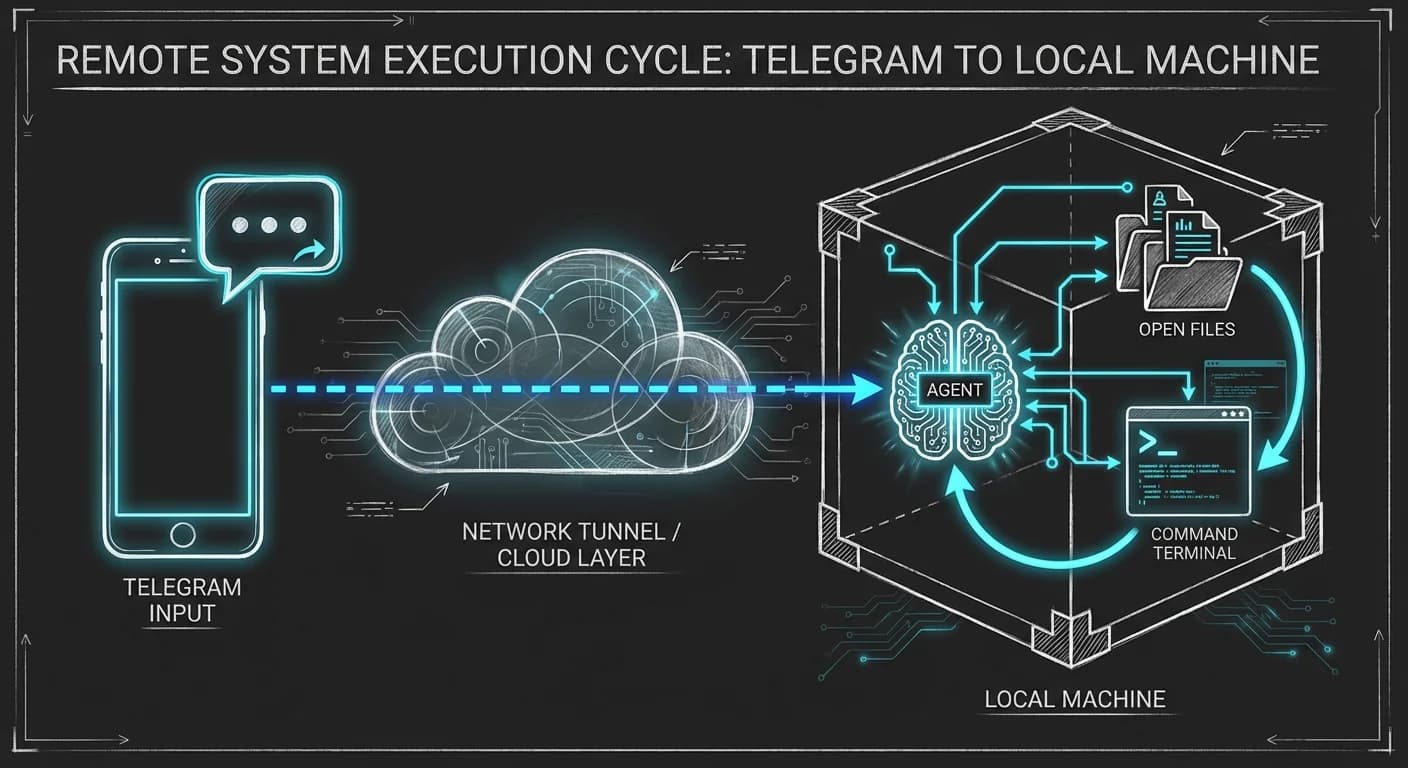
By the end of this guide, you will have a persistent AI Agent running on your local machine that you can text via Telegram. It will remember your previous conversations and be able to execute code locally.
The End State:
- Input: You message Telegram: "Check the logs in my project folder and summarize the last error."
- Process: OpenClaw reads the local file, analyzes the stack trace, and cross-references it with your previous code style preferences.
- Output: OpenClaw replies with the fix.
2. Prerequisites
Don't start until you have these ready. We hate context switching.
- Node.js: Latest LTS installed. (It’s a TypeScript app).
- Terminal: You need to be comfortable with CLI.
- LLM API Key: We recommend Anthropic (Claude 3.5 Sonnet is currently the SOTA for agentic coding) or OpenAI. Note: You can use local models via Ollama, but you need 16GB+ RAM for decent performance.
- Telegram Account: We use Telegram for the "Interface" because the API is the easiest to provision.
3. The Step-by-Step Guide
Step 1: The Canonical Install
OpenClaw moves fast. The only reliable way to install it is the official bootstrap script. Open your terminal:
bash
What this does: Detects your OS, installs dependencies, and launches the Terminal User Interface (TUI).
Step 2: The "QuickStart" Configuration
The TUI will launch. Do not try to be a hero and choose "Advanced" yet.
- Select QuickStart (Spacebar to select, Enter to confirm).
- Select Provider: Choose Anthropic.
- Paste API Key: Copy it from your dashboard.
⚠️ Security Note: This key is stored locally in ~/.openclaw/config.json.
Step 3: The Interface (Telegram)
OpenClaw needs a "body" to talk to you. Telegram is the path of least resistance.
- Open Telegram and search for @BotFather.
- Type /newbot.
- Give it a name (e.g., MyDevAgent_Bot).
- BotFather will give you a Token. It looks like this:
TEXT
- Paste this token into the OpenClaw TUI when prompted.
Once the TUI says "Gateway Connected," send a "Hello" to your new bot on Telegram. If it replies, you are live.
💡 The PAI "Lightbulb Moment": Persistent Memory
Most devs treat this like ChatGPT—a stateless session. Stop doing that.
OpenClaw has Episodic Memory. It stores context as structured JSON/Markdown locally on your disk. It doesn't just "remember" the chat; it builds a knowledge graph.
Try this workflow:
- Tell it: "My project 'Project X' uses React and Tailwind. Always prefer functional components."
- Wait 3 days.
- Start a new chat: "Write a navbar for Project X."
It will use React and Tailwind automatically. This is where the real productivity gain happens—you stop repeating your prompts.
4. Common Pitfalls (The "Danger Zone")
This is where most developers get burned. We analyzed the recent security reports, and here is what you need to know to avoid getting pwned.
🔴 The RCE Vulnerability (CVE-2026-25253)
There is a high-severity flaw involving the Control UI. A bug in OpenClaw enables one-click Remote Code Execution via WebSocket hijacking.
The Fix: Do NOT expose the Gateway port to the internet. Bind it to 127.0.0.1. If you need remote access, use a VPN (Tailscale/WireGuard), never port forwarding.
🔴 The "ClawHub" Trap
OpenClaw has a skill store called "ClawHub." Treat this like npm in 2016 but worse. Researchers have found hundreds of malicious skills in ClawHub designed to steal crypto credentials and API keys.
The Fix: Audit every skill .md file before you install it. Do not install the "Crypto Ticker" or "Social Media Manager" skills unless you wrote them yourself. This is a classic vector for data poisoning.
🔴 The "Shadow AI" Risk
Do not install this on your corporate laptop without explicit permission. OpenClaw bypasses DLP because it reads local files and sends tokens to LLM providers. If you feed it proprietary code, you are exfiltrating data. Security teams can see the traffic pattern, and they will find you.
5. Next Steps: Productionizing
You have it running on your laptop. Now you want it running 24/7.
- Get off Localhost: Move this to a dedicated VPS or a home server (Raspberry Pi 5 is decent for this).
- Dockerize It: Don't run this bare metal. Use a container to limit the "blast radius" if the agent goes rogue or gets hijacked.
- Least Privilege: Configure the exec permissions. Do not give it sudo. Only give it read/write access to a specific /data folder, not your $HOME directory.
OpenClaw is powerful because it breaks the rules of traditional sandboxing. That is its feature and its bug. Respect the tool, and it will serve you well.
Now, go build something.
📩 Stay Updated: For more deep dives into AI security and agent architecture, subscribe to our newsletter.
OpenClaw
AI Agents
Tutorial
Cybersecurity
Local LLM
Moltbot
Clawdbot